 Built by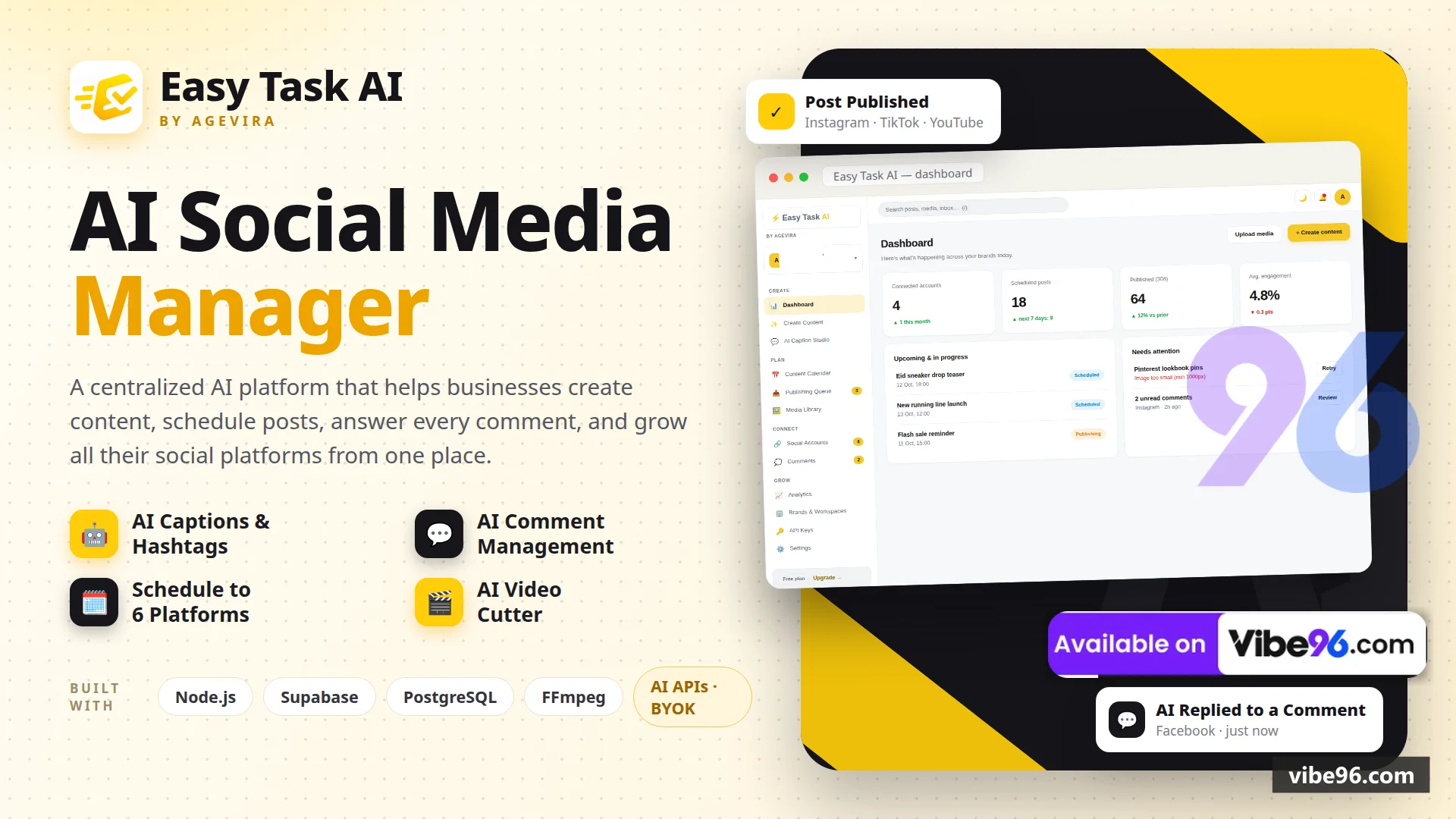
About this software
About EasyTaskAI
Easy Task AI is a complete multi-platform social media management system built on Node.js, Express and Supabase. Users create content once and publish it to Instagram, Facebook, LinkedIn, X, Pinterest, YouTube, TikTok and Threads with AI-generated captions, hashtags and aspect-ratio-safe media. The system includes a unified comments inbox with AI-assisted replies, an AI video cutter that clips long videos using transcription, and a media library with imports from Google Drive, Dropbox and Canva. Users bring their own AI provider keys (OpenAI, Gemini, Claude, xAI or DeepSeek) so the operator never pays for AI usage. Payments are handled via manual bKash/Nagad flows and international transfers with admin approval; an optional Paddle card checkout is built in but dormant.
Why EasyTaskAI
What makes it better
than the alternatives
- 01
Bring-your-own-key AI
- 02
AI video cutter
- 03
Eight-platform publishing
- 04
Manual payment flows with admin approval
- 05
Full bilingual UI
Content Creation & Scheduling
- Multi-platform composer with per-platform aspect-ratio-safe media (Instagram 1:1
- TikTok 9:16
- YouTube 16:9
- etc.)
- AI caption generator with tone selection (professional
- casual
- friendly
- humorous
- inspirational)
- AI hashtag generator with platform-specific recommendations
- AI content packages (caption + hashtags + image) from a single prompt
- AI review & one-click improve for existing captions
- Schedule posts to Instagram
- X
- YouTube
- TikTok and Threads
- Calendar view with drag-and-drop rescheduling
- Queue view with status tracking (scheduled
- publishing
- published
- failed)
- Free-tier schedule limit: 5 posts per platform per month (enforced server-side)
- Background publisher worker
worker/publisher.jspolls scheduled posts every 30 seconds and publishes via platform adapters
AI Video Cutter
- Upload video (up to 500 MB)
- transcribe with Whisper API (user's OpenAI key)
- Interactive transcript editor with word-level timestamps
- Select text ranges to define clips; the system calculates exact video timestamps
- Auto-generate captions (SRT format) for each clip
- Export clips without re-encoding (FFmpeg stream copy); captions burned in or separate SRT
- Download individual clips or all clips as a ZIP
- Clips saved to media library for use in scheduled posts
Comments & Inbox
- Unified inbox aggregates comments from Facebook
- TikTok
- YouTube and X
- Manual reply composer per comment
- AI-assisted reply generation (user's AI provider key; tone selection: professional
- friendly
- humorous)
- Mark comments as read/unread
- Filter by platform
- read/unread status
- Background worker syncs comments every ~2 minutes (configurable COMMENTS_POLL_TICKS)
- Comment sync respects platform rate limits (Facebook/Instagram 200 req/hour
- TikTok 100 req/day
- YouTube 10
- 000 units/day
- X 50 req/15min)
Media Library & Integrations
- Upload images and videos (drag-and-drop or file picker; max 100 MB per file)
- Import from Google Drive (OAuth
- user selects files from picker)
- Import from Dropbox (OAuth
- user selects files from chooser)
- Import from Canva (OAuth
- user selects designs; exports as PNG/MP4)
- AI image generator (DALL·E 3 via user's OpenAI key; prompt + size selection)
- Grid view with search by filename
- Delete media (removes from library and Supabase Storage)
- Media used in composer and video cutter
Social Accounts & OAuth
- Connect Facebook Pages (Meta OAuth; scopes: pages_show_list
- pages_read_engagement
- pages_manage_posts
- pages_manage_metadata)
- Connect Instagram Business accounts (via Facebook Page; scopes: instagram_basic
- instagram_content_publish
- instagram_manage_comments)
- Connect Threads accounts (separate Meta app; scopes: threads_basic
- threads_content_publish
- threads_manage_replies)
- Connect TikTok accounts (OAuth; scopes: user.info.basic
- video.upload)
- Connect YouTube channels (Google OAuth; scope: youtube.upload)
- Connect X accounts (OAuth 2.0; requires PAID X API tier for posting)
- Connect LinkedIn profiles (OAuth; Share on LinkedIn product)
- Connect Pinterest boards (OAuth; scopes: boards:read
- pins:write)
- Token refresh handled automatically by platform adapters
lib/platforms/*.js) - Encrypted token storage (AES vault; CREDENTIALS_ENCRYPTION_KEY in .env)
- Disconnect accounts (revokes tokens
- deletes from database)
Workspaces & Team
- Multi-workspace support (each user has a default workspace; can create additional workspaces)
- Workspace switcher in header (avatar + name dropdown)
- Workspace settings: name
- avatar upload
- timezone
- language (English/Bangla)
- Row Level Security policies scope all queries to workspaces the user owns or belongs to
- Team module built but hidden (eta_workspace_members table exists; UI commented out in NAV array)
- Admin role flag (is_admin column in eta_users; only admins see Upgrade Requests page)
Payments & Plans
- Free tier: 3-day trial with full AI access
- then schedule-only (5
posts/platform/month - Lifetime plan: one-time payment (৳3
- 500 BDT or $35 USD; configurable in .env)
- bKash payment flow: user submits transaction ID
- admin approves in Upgrade Requests page
- Nagad payment flow: user submits transaction ID
- admin approves in Upgrade Requests page
- International payment flow: user submits transfer reference
Payoneer/Wise/bankdetails shown from INTL_PAY_DETAILS in .env) - admin approves
- Upgrade Requests admin page: list of
pending/approved/rejectedrequests with approve/reject buttons - Paddle card checkout built in (migration-021.sql
lib/paddle.js- /
api/billing/paddle/*) but dormant unless PADDLE_* env vars are set - Plan enforcement server-side: requirePro middleware blocks AI endpoints for expired trials; freeScheduleLimitHit() enforces 5-post limit
Analytics & Insights
- Dashboard: total posts
- scheduled posts
- connected accounts
- recent activity feed
- Analytics page: post performance metrics (placeholder UI; real metrics require platform API calls)
- Brand profiles: save brand voice
- target audience
- content pillars
- posting schedule preferences
- Brand profile AI assistant: generate content packages aligned with saved brand voice
Settings & API Keys
- User settings: email
- password change
- timezone
- language (English/Bangla)
- Workspace settings: name
- avatar
- default timezone
- default language
- API Keys page: user supplies their own OpenAI
- Anthropic (Claude)
- Google (Gemini)
- xAI (Grok) or DeepSeek keys
- Encrypted key storage (AES vault; keys never sent to browser or logged)
- Test key button (validates key with a cheap API call before saving)
- Email notifications toggle (SMTP configured in .env;
lib/email.jssends via Nodemailer) - Theme toggle (light/dark mode; saved to localStorage)
Admin & Demo
- Admin flag (is_admin column in eta_users; set manually in Supabase SQL editor)
- Upgrade Requests page (only visible to admins; approve/reject payment submissions)
- Demo login buttons (optional; set DEMO_USER_EMAIL/PASSWORD and DEMO_ADMIN_EMAIL/PASSWORD in .env)
- Demo rate limiting (10 logins per IP per hour; tracked in eta_demo_logins table)
- Platform status endpoint (/
api/platforms/status; shows which platforms are configured)
| Language | Version | Framework | Used for | Share of code |
|---|---|---|---|---|
| JavaScript | — | — | Front-end | 82.5% |
| SQL | — | — | Database | 11.8% |
| CSS | — | — | Styling | 4.2% |
| HTML | — | — | Front-end | 1.5% |
- Primary language
- Node.js 20+
- Framework
- Express 5.3
- Database
- PostgreSQL 15+ (Supabase)
- Authentication
- Supabase Auth (email/password + Google OAuth)
- Licence
- Single-site
- Screens
- 18
- Database tables
- 23
- Supported languages
- English, Bangla (বাংলা)
- Browser support
- Modern browsers (Chrome, Firefox, Safari, Edge — ES2020+)
| Minimum | Recommended | |
|---|---|---|
| CPU | 1 vCPU | 2 vCPU |
| RAM | 2 GB RAM / 20 GB disk | 4 GB RAM / 40 GB disk |
| OS | Node.js 20+ on Linux, macOS or Windows; FFmpeg (bundled via ffmpeg-static) | Node.js 20+ on Linux, macOS or Windows; FFmpeg (bundled via ffmpeg-static) |
| Est. monthly hosting | $25 | $25 |
```bash
sudo apt update && sudo apt install -y nodejs npm git
git clone <repo-url> easy-task-ai && cd easy-task-ai
npm install
cp .env.example .env
# Edit .env with your Supabase credentials, SMTP, platform OAuth keys
# Run supabase/migration-all.sql in Supabase SQL editor
node server.js &
node worker/publisher.js &
# Reverse proxy via nginx/Caddy on port 80/443
```
```bash
git clone <repo-url> easy-task-ai && cd easy-task-ai
cp .env.example .env
# Edit .env with your credentials
# Run supabase/migration-all.sql in Supabase SQL editor
docker build -t easy-task-ai .
docker run -d -p 3002:3002 --env-file .env --name etai-api easy-task-ai node server.js
docker run -d --env-file .env --name etai-worker easy-task-ai node worker/publisher.js
```
1. Fork the repo, connect to Render/Railway/Fly
2. Add environment variables from .env.example
3. Run supabase/migration-all.sql in Supabase SQL editor
4. Deploy two services: `node server.js` (web) + `node worker/publisher.js` (worker)
5. Set APP_URL to your deployed domain
```bash
npm install
cp .env.example .env
# Paste Supabase URL, anon key, service key, SMTP credentials into .env
# Run supabase/migration-all.sql in Supabase SQL editor (copy/paste)
node server.js
# In a second terminal:
node worker/publisher.js
# Open http://localhost:3002
```
Quality report
Manually reviewedHow to read the quality report
What this is. Every project on Vibe96 goes through an automated audit of its source code before a reviewer in Dubai checks it by hand. The score is out of 100; 75 is the minimum to be listed, and any single failing check blocks a listing regardless of the score.
- Security
- No real credentials in the code, every data-changing route protected, admin areas role-gated, no SQL built from user input.
- Code structure
- A developer can navigate and extend it: clear module boundaries, no giant files, little copy-paste.
- Docs & completeness
- The setup guide, example config, schema and required files the builder committed to are actually in the archive.
- Dependency health
- Packages pinned, no known critical vulnerabilities, no abandoned libraries in production paths.
- Build & deploy
- A clean machine can restore, build and start it by following the shipped instructions.
Warnings are problems that didn't block the listing; they stay visible here until a later version clears them. The audit reads the code — it does not run it — so always try the live demo before you buy. Lines of code are counted from the same audited archive.
Reviewer notes (2 minor)
Strong auth on mutating endpoints; minor ownership gaps on read-only routes; moderate code duplication and oversized files; some business logic in views. None of these stop the software from working; the developer has been told and improvements come in a future update.
Versions & updates
No updates yet. New versions appear here with a changelog.
Buyers receive updates free for 1 year.
What you get
- </>Full source codeThe complete audited source, delivered as a download from your account. No obfuscation.
- ▤DocumentationSetup guide, architecture notes, CLAUDE.md and AGENTS.md.
- ↻One year of updatesEvery new version the builder publishes, free for 12 months.
- ♧30 days of supportInstallation and defect support through Vibe96 tickets.