 Built by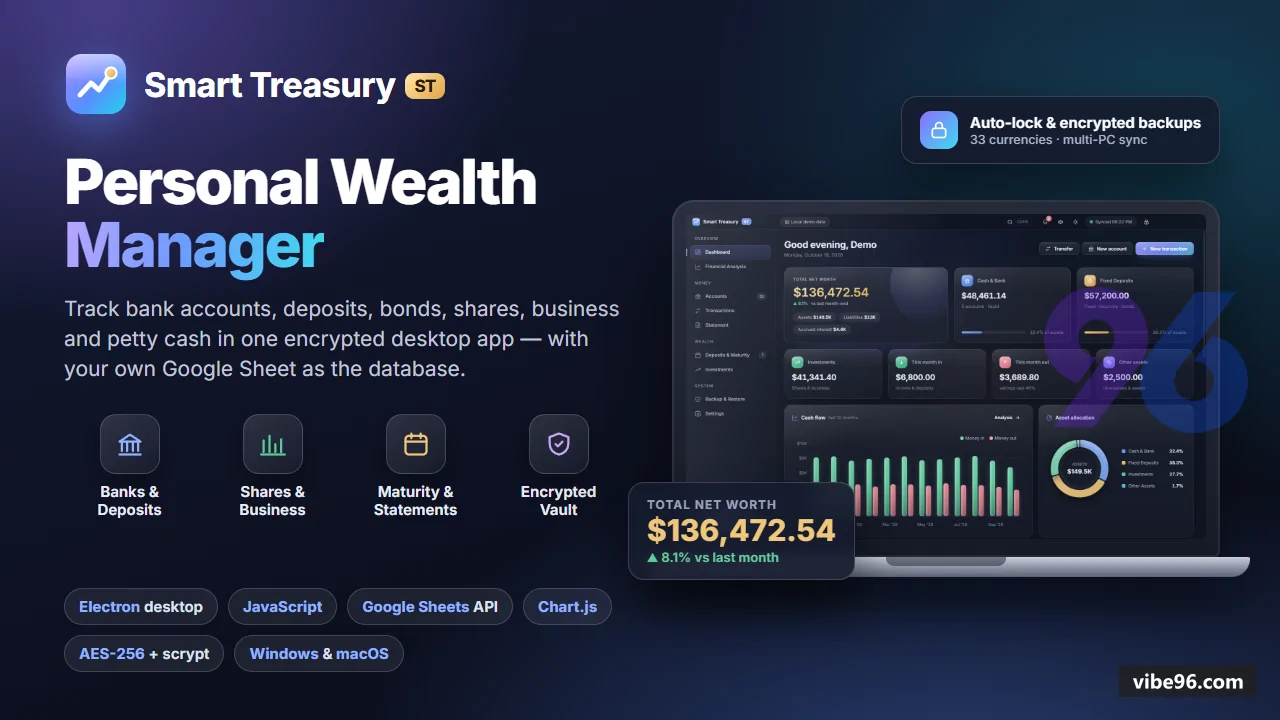
About this software
About Smart Treasury
Smart Treasury is a Windows/macOS Electron desktop app for tracking personal and family wealth across bank accounts, fixed and recurring deposits, savings bonds, shares, business stakes, petty cash and loans. The database is the user's own Google Sheet, accessed via a service-account connection encrypted with a master password (AES-256-GCM, scrypt-derived key). It computes compound interest, recurring deposit maturity, tax withheld, average-cost share holdings and realised/unrealised gains. The app works in any currency (33 built in), supports International or South Asian banking terms (DPS, FDR, Sanchayapatra, BO accounts, Lakh/Crore grouping), and locks automatically when idle or when the OS locks.
Why Smart Treasury
What makes it better
than the alternatives
- 01
User-owned data
- 02
Multi-computer sync
- 03
Master-password vault
- 04
Real financial maths
- 05
Local where it matters
Accounts
- 12 account types: bank
- recurring deposit (DPS)
- fixed deposit/CD (FDR)
- savings bond (Sanchayapatra)
- brokerage (share)
- business
- petty cash
- cash
- mobile wallet
- receivable
- other asset
- loan
- Each account stores bank name
- branch
- account number
- holder
- nominee
- opening date and balance
- interest rate
- compounding frequency
- tenure
- installment
- maturity date
- maturity amount (bank's figure or auto-calculated)
- tax withheld
- card colour
- Account groups for organising (e.g. 'Family'
- 'Business') with group-level balance totals
- Account detail screen shows running balance
- recent transactions
- maturity countdown (for deposits)
- holdings and gains (for shares)
Transactions
- Deposits
- withdrawals
- income
- expenses
- interest
- dividends
- fees
- tax
- adjustments
- Transfers between user's own accounts (deposit installments and loan payments included); transfers never counted as income or expense
- Each transaction has account
- date
- amount
- direction (in/out)
- category
- description
- optional transfer link
- Transactions created by share trades have link_id to the trade record
- Filter by account
- date range
- category
- direction; search by description
Statement
- Any account
- account group or account type
- for any date range
- Shows opening balance
- running balance per transaction
- total credit and debit
- closing balance
- Exports to PDF
- Excel (.xlsx) or print
- Statement generation uses dependency-free .xlsx writer (ZIP + SpreadsheetML) in
src/main/xlsx.js
Deposits & Maturity
- Countdown to each maturity (recurring deposits
- fixed deposits
- savings bonds)
- Expected vs bank-quoted maturity amount
- with compound interest calculation (daily
- monthly
- quarterly
- half-yearly
- yearly compounding)
- Tax withheld on interest (configurable rate per account)
- Accrued interest to date for each deposit
- Maturity badge in sidebar when any deposit matures within 30 days
Investments (Shares)
- Share buy/sell log in Trades table; holdings and average cost derived from it
- Latest traded price per symbol in Prices table (manual entry or paste from broker)
- Realised gains (from closed positions) and unrealised gains (from open holdings)
- Holdings screen shows symbol
- quantity
- average cost
- current price
- market value
- gain/loss
- gain %
- Investments screen aggregates all brokerage accounts with total market value and total gain
Financial Analysis
- Net worth trend (monthly snapshots over 12 months)
- Income vs expenses (monthly bar chart)
- Account-type breakdown (pie chart: bank
- deposits
- shares
- business
- cash
- loans)
- Top income and expense categories (bar charts)
- All charts use Chart.js 4.5.1 with custom theme (chart-theme.js) matching app light/dark mode
Backup & Restore
- Automatic daily backup of encrypted vault + offline cache to local backup folder (default: 7 backups kept)
- Manual backup on demand (exports vault + cache as .stbackup file)
- Restore from any .stbackup file (replaces current vault and cache
- requires master password)
- Backup folder location shown in settings; reveal in file manager button
- Backup payload includes vault (encrypted Google connection)
- offline cache (last synced data)
- lockout state
Security & Session
- Master password encrypts Google service-account key and Sheet link (AES-256-GCM
- scrypt key derivation with N=32768
- r=8
- p=1)
- Session auto-locks after 15 minutes idle (configurable 5–60 min) or when OS locks
- Unlock throttled to one attempt per second; 5 wrong attempts in 60 s → 60 s lockout (exponential backoff)
- Access control enforced in main process: while locked
- no data channel answers (ipc.js ACCESS.SESSION
- ACCESS.VAULT levels)
- Activity log (Log table) records logins
- password changes
- backups
- restores
- important edits with timestamp and description
- Password strength meter on setup and change-password screens; optional password hint (stored unencrypted)
Google Sheets Integration
- Database is user's own Google Sheet: one tab per table (Accounts
- Transactions
- Trades
- Prices
- Settings
- Log)
- row 1 = column names
- column A = record id
- Service-account OAuth (RS256 JWT
- google-auth.js) with token refresh 5 min before expiry
- SheetsClient (sheets.js) ensures missing tabs/headers on first connect
- reads all rows
upserts/removes/replacesrows via Sheets v4 REST API- Offline cache (last synced data) in local data folder; app works offline with read-only mode until connection returns
- Sync on demand (refresh button) or automatic on data change; conflict detection (server wins
- local changes rejected with warning)
Settings & Preferences
- Currency (33 built in: USD
- EUR
- GBP
- INR
- BDT
- PKR
- LKR
- NPR
- AED
- SAR
- etc.; or type custom symbol)
- Number grouping: International (1
- 234
- 567) or South Asian (12
- 34
- 567)
- Banking terms: International (fixed deposit
- recurring deposit
- savings bond
- brokerage account) or South Asian (FDR
- DPS
- Sanchayapatra
- BO account)
- Theme: light
- dark or system (persisted in localStorage; applies to window title bar on Windows)
- Privacy mode: hides all amounts and balances (toggle with Ctrl+H or eye icon in title bar)
- Auto-lock timeout (5–60 minutes)
- backup retention (1–30 days)
- Change master password (requires current password); reset connection (removes vault
- cache
- lockout file; Google Sheet untouched)
| Language | Version | Framework | Used for | Share of code |
|---|---|---|---|---|
| JavaScript | — | — | Front-end | 81.4% |
| CSS | — | — | Styling | 10.6% |
| SQL | — | — | Database | 6.4% |
| HTML | — | — | Front-end | 1.5% |
- Primary language
- JavaScript (Node.js 20.18+)
- Framework
- Electron 44.9.0
- Database
- Google Sheets (via REST API v4)
- Authentication
- Master password (scrypt + AES-256-GCM)
- Licence
- Single-site
- Screens
- 9
- Database tables
- 6
- Supported languages
- 33 built-in currencies, International/South Asian banking terms, number grouping (1,234,567 or 12,34,567)
- Browser support
- Chromium 132 (Electron embedded)
| Minimum | Recommended | |
|---|---|---|
| CPU | 2 vCPU | 2 vCPU |
| RAM | 2 GB RAM / 500 MB disk | 4 GB RAM / 1 GB disk |
| OS | Windows 10+ or macOS 11+, Electron 44 (Node.js 20.18, Chromium 132) | Windows 10+ or macOS 11+, Electron 44 (Node.js 20.18, Chromium 132) |
| Est. monthly hosting | $24 | $24 |
Quality report
Manually reviewedHow to read the quality report
What this is. Every project on Vibe96 goes through an automated audit of its source code before a reviewer in Dubai checks it by hand. The score is out of 100; 75 is the minimum to be listed, and any single failing check blocks a listing regardless of the score.
- Security
- No real credentials in the code, every data-changing route protected, admin areas role-gated, no SQL built from user input.
- Code structure
- A developer can navigate and extend it: clear module boundaries, no giant files, little copy-paste.
- Docs & completeness
- The setup guide, example config, schema and required files the builder committed to are actually in the archive.
- Dependency health
- Packages pinned, no known critical vulnerabilities, no abandoned libraries in production paths.
- Build & deploy
- A clean machine can restore, build and start it by following the shipped instructions.
Warnings are problems that didn't block the listing; they stay visible here until a later version clears them. The audit reads the code — it does not run it — so always try the live demo before you buy. Lines of code are counted from the same audited archive.
Reviewer notes (1 minor)
Dependencies pinned in lockfile; electron 44.9.0 and chart.js 4.5.1 are outdated; moderate code duplication and some oversized files; structure is sound but maintainability could improve. None of these stop the software from working; the developer has been told and improvements come in a future update.
Versions & updates
No updates yet. New versions appear here with a changelog.
Buyers receive updates free for 1 year.
What you get
- </>Full source codeThe complete audited source, delivered as a download from your account. No obfuscation.
- ▤DocumentationSetup guide, architecture notes, CLAUDE.md and AGENTS.md.
- ↻One year of updatesEvery new version the builder publishes, free for 12 months.
- ♧30 days of supportInstallation and defect support through Vibe96 tickets.